Showing posts with label Datawearhouse. Show all posts

Wednesday, 8 April 2015

What is metadata (Data about data)

Meta Data

The ETL metadata functional element is responsible for maintaining information (metadata) about the movement and transformation of data, and the operation of the data warehouse. It also documents the data mappings used during the transformations. Meta data logging provides possibilities for automated administration, trend prediction, and code reuse.
Metadata

Meta data examples:

Examples of data warehouse metadata that can be recorded and used to analyze the activity and performance of a data warehouse include:
o   Data Lineage, such as the time that a particular set of records was loaded into the data warehouse.
o   Schema Changes, such as changes to table definitions. 
o   Data Type Usage, such as identifying all tables that use the "Birthdate" user-defined data type. 
o   Transformation Statistics, such as the execution time of each stage of a transformation, the number of rows processed by the transformation, the last time the transformation was executed, and so on. 
o   DTS Package Versioning, which can be used to view, branch, or retrieve any historical version of a particular DTS package.
o   Data Warehouse Usage Statistics, such as query times for reports. 

Business Metadata:
In IT, Business Metadata is about creating definitions, business rules. The advantage is of this business metadata is whether they are technical or non-technical, everybody would understand what is going on within the organization. Example:
Metadata in ETL
Business Metadata
                     

Technical Metadata:
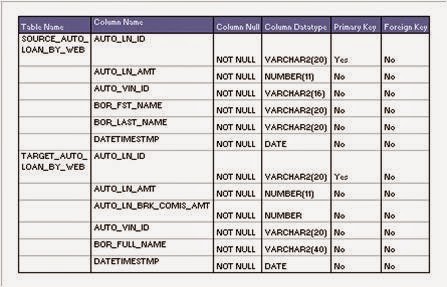
 Technical metadata describes information about technology such as the ownership of the database, physical characteristics of a database. In Technical metadata, derivation rules are important when formulae or calculations are applied on a column. Example:

Metadata IN ETL
Technical Metadata

Facebook Commentbox


Tuesday, 24 February 2015

Data Warehouse Design Approaches

Data Warehouse Design Approaches


There are two major types of approaches to building or designing the Data Warehouse.
  1.  The Top-Down Approach
  2.  The Bottom-Up Approach


s  The Top Down Approach:

  •       The data flow in the top down OLAP environment begins with data extraction from the operational data sources. This data is loaded into the staging area and validated and consolidated for ensuring a level of accuracy and then transferred to the Operational Data Store (ODS). 
  •      Detailed data is regularly extracted from the ODS and temporarily hosted in the staging area for aggregation, summarization and then extracted and loaded into the Data warehouse. 
  •      Once the Data warehouse aggregation and summarization processes are complete, the data mart refresh cycles will extract the data from the Data warehouse into the staging area and perform a new set of transformations on them. This will help organize the data in particular structures required by data marts. Then the data marts can be loaded with the data and the OLAP environment becomes available to the users

DWH TOP DOWN APPROACH
DWH TOP DOWN DESIGN APPROACH
  •     The data marts are treated as sub sets of the data warehouse. Each data mart is built for an individual department and is optimized for analysis needs of the particular department for which it is created.


 The Bottom-Up Approach:
          

  •      Ralph Kimball designed the data warehouse with the data marts connected  to it with a bus structure.
  •      The bus structure contained all the common elements that are used by data marts such as conformed dimensions, measures etc defined for the enterprise as a whole. 
  •        This architecture makes the data warehouse more of a virtual reality than a physical reality
  •       All data marts could be located in one server or could be located on different servers across the enterprise while the data warehouse would be a virtual entity being nothing more than a sum total of all the data marts
  •      In this context even the cubes constructed by using OLAP tools could be considered as data marts.

Kimball's  bottom-up Design Apporach
Kimball Approach

              The bottom-up approach reverses the positions of the Data warehouse  and the Data marts. Data marts are directly loaded with the data from the   operational systems through the staging area.

                   The data flow in the bottom up approach starts with extraction of data  from operational databases into the staging area where it is processed  and consolidated and then loaded into the ODS.

         The data in the ODS is appended to or replaced by the fresh data being loaded. After the ODS is refreshed the current data is once again extracted into the staging area and processed to fit into the Data mart  structure. The data from the Data Mart, then is extracted to the staging area aggregated, summarized and so on and loaded into the Data Warehouse and made available to the end user for analysis.


Facebook Commentbox


Friday, 30 January 2015

SQL interview Questions and answers for Freshers


DATABASE interview questions for freshers
SQl Interview Qustions For Fresher's


1.  What is the difference between a "where" clause and a "having" clause? 
 - "Where" is a kind of restiriction statement. You use where clause to restrict all the data from DB.Where clause is using before result retrieving. But Having clause is using after retrieving the data.Having clause is a kind of filtering command.

2.  What is the basic form of a SQL statement to read data out of a table? 
   -The basic form to read data out of table is ‘SELECT * FROM table_name; ‘ An answer: ‘SELECT * FROM table_name WHERE xyz= ‘whatever’;’ cannot be called basic form because of WHERE clause.

3. What structure can you implement for the database to speed up table reads?
  - Follow the rules of DB tuning we have to: 1] properly use indexes ( different types of indexes) 2] properly locate different DB objects across different tablespaces, files and so on.3] create a special space (tablespace) to locate some of the data with special datatype ( for example CLOB, LOB and …)

4. What are the tradeoffs with having indexes
 - 1. Faster selects, slower updates. 
   2. Extra storage space to store indexes. Updates are slower because in addition to updating the table you have to update the index.

5. What is a "join"? 
 - ‘join’ used to connect two or more tables logically with or without common field.

6. What is "normalization"? "Denormalization"? Why do you sometimes want to denormalize? 
  - Normalizing data means eliminating redundant information from a table and organizing the data so that future changes to the table are easier. Denormalization means allowing redundancy in a table. The main benefit of denormalization is improved performance with simplified data retrieval and manipulation. This is done by reduction in the number of joins needed for data processing.

7. What is a "constraint"? 
  - A constraint allows you to apply simple referential integrity checks to a table. There are four primary types of constraints that are currently supported by SQL Server: PRIMARY/UNIQUE - enforces uniqueness of a particular table column. DEFAULT - specifies a default value for a column in case an insert operation does not provide one. FOREIGN KEY - validates that every value in a column exists in a column of another table. CHECK - checks that every value stored in a column is in some specified list. Each type of constraint performs a specific type of action. Default is not a constraint. NOT NULL is one more constraint which does not allow values in the specific column to be null. And also it the only constraint which is not a table level constraint.

8. What types of index data structures can you have? 
  - An index helps to faster search values in tables. The three most commonly used index-types are: - B-Tree: builds a tree of possible values with a list of row IDs that have the leaf value. Needs a lot of space and is the default index type for most databases. - Bitmap: string of bits for each possible value of the column. Each bit string has one bit for each row. Needs only few space and is very fast.(however, domain of value cannot be large, e.g. SEX(m,f); degree(BS,MS,PHD) - Hash: A hashing algorithm is used to assign a set of characters to represent a text string such as a composite of keys or partial keys, and compresses the underlying data. Takes longer to build and is supported by relatively few databases.

9. What is a "primary key"? 
  - A PRIMARY INDEX or PRIMARY KEY is something which comes mainly from database theory. From its behavior is almost the same as an UNIQUE INDEX, i.e. there may only be one of each value in this column. If you call such an INDEX PRIMARY instead of UNIQUE, you say something about
your table design, which I am not able to explain in few words. Primary Key is a type of a constraint enforcing uniqueness and data integrity for each row of a table. All columns participating in a primary key constraint must possess the NOT NULL property.

10.What is a "functional dependency"? How does it relate to database table design? 
  - Functional dependency relates to how one object depends upon the other in the database. for example, procedure/function sp2 may be called by procedure sp1. Then we say that sp1 has functional dependency on sp2.

11.What is a "trigger"? 
  - Triggers are stored procedures created in order to enforce integrity rules in a database. A trigger is executed every time a data-modification operation occurs (i.e., insert, update or delete). Triggers are executed automatically on occurance of one of the data-modification operations. A trigger is a database object directly associated with a particular table. It fires whenever a specific statement/type of statement is issued against that table. The types of statements are insert,update,delete and query statements. Basically, trigger is a set of SQL statements A trigger is a solution to the restrictions of a constraint. For instance: 1.A database column cannot carry PSEUDO columns as criteria where a trigger can. 2. A database constraint cannot refer old and new values for a row where a trigger can.

12.Why can a "group by" or "order by" clause be expensive to process
  - Processing of "group by" or "order by" clause often requires creation of Temporary tables to process the results of the query. Which depending of the result set can be very expensive.

13.What is "index covering" of a query
   - Index covering means that "Data can be found only using indexes, without touching the tables"


14.What is a SQL view? 
  - An output of a query can be stored as a view. View acts like small table which meets our criterion. View is a precomplied SQL query which is used to select data from one or more tables. A view is like a table but it doesn’t physically take any space. View is a good way to present data in a particular format if you use that query quite often. View can also be used to restrict users from accessing the tables directly.


    Thank you Readers.If you have more Question or suggestions for Sql Interview Qustions for freshers then please comment on below box.

Facebook Commentbox

Sunday, 25 January 2015

Datawearhousing OLAP

OLAP in Datawearhouse

Defination

OLAP (Online Analytical Processing) is the technology behind many Business Intelligence (BI) applications. OLAP is a powerful technology for data discovery, including capabilities for limitless report viewing, complex analytical calculations, and predictive “what if” scenario (budget, forecast) planning.
How is OLAP Technology Used?
OLAP is an acronym for Online Analytical Processing. OLAP performs multidimensional analysis of business data and provides the capability for complex calculations, trend analysis, and sophisticated data modeling. It is the foundation for may kinds of business applications for Business Performance Management, Planning, Budgeting, Forecasting, Financial Reporting, Analysis, Simulation Models, Knowledge Discovery, and Data Warehouse Reporting. OLAP enables end-users to perform ad hoc analysis of data in multiple dimensions, thereby providing the insight and understanding they need for better decision making.


Types of OLAP Servers

We have four types of OLAP servers:
  • Relational OLAP (ROLAP)
  • Multidimensional OLAP (MOLAP)
  • Hybrid OLAP (HOLAP)
  • Specialized SQL Servers

Relational OLAP

ROLAP servers are placed between relational back-end server and client front-end tools. To store and manage warehouse data, ROLAP uses relational or extended-relational DBMS.
ROLAP includes the following:
  • Implementation of aggregation navigation logic.
  • Optimization for each DBMS back end.
  • Additional tools and services.

Multidimensional OLAP

MOLAP uses array-based multidimensional storage engines for multidimensional views of data. With multidimensional data stores, the storage utilization may be low if the data set is sparse. Therefore, many MOLAP server use two levels of data storage representation to handle dense and sparse data sets.


Hybrid OLAP (HOLAP)

Hybrid OLAP is a combination of both ROLAP and MOLAP. It offers higher scalability of ROLAP and faster computation of MOLAP. HOLAP servers allows to store the large data volumes of detailed information. The aggregations are stored separately in MOLAP store.


OLAP Operations

Since OLAP servers are based on multidimensional view of data, we will discuss OLAP operations in multidimensional data.
Here is the list of OLAP operations:
  • Roll-up
  • Drill-down
  • Slice and dice
  • Pivot (rotate)

Roll-up

Roll-up performs aggregation on a data cube in any of the following ways:
  • By climbing up a concept hierarchy for a dimension
  • By dimension reduction
The following diagram illustrates how roll-up works. 
Roll-up
·        Roll-up is performed by climbing up a concept hierarchy for the dimension location.
·        Initially the concept hierarchy was "street < city < province < country".
·        On rolling up, the data is aggregated by ascending the location hierarchy from the level of city to the level of country.
·        The data is grouped into cities rather than countries.
·        When roll-up is performed, one or more dimensions from the data cube are removed.

Drill-down

Drill-down is the reverse operation of roll-up. It is performed by either of the following ways:
  • By stepping down a concept hierarchy for a dimension
  • By introducing a new dimension.
The following diagram illustrates how drill-down works:
Drill-Down
·        Drill-down is performed by stepping down a concept hierarchy for the dimension time.
·        Initially the concept hierarchy was "day < month < quarter < year."
·        On drilling down, the time dimension is descended from the level of quarter to the level of month.
·        When drill-down is performed, one or more dimensions from the data cube are added.
·        It navigates the data from less detailed data to highly detailed data.

Slice

The slice operation selects one particular dimension from a given cube and provides a new sub-cube. Consider the following diagram that shows how slice works.
Slice
·        Here Slice is performed for the dimension "time" using the criterion time = "Q1".
·        It will form a new sub-cube by selecting one or more dimensions.

Dice

Dice selects two or more dimensions from a given cube and provides a new sub-cube. Consider the following diagram that shows the dice operation.
Dice
The dice operation on the cube based on the following selection criteria involves three dimensions.
  • (location = "Toronto" or "Vancouver")
  • (time = "Q1" or "Q2")
  • (item =" Mobile" or "Modem")

Pivot

The pivot operation is also known as rotation. It rotates the data axes in view in order to provide an alternative presentation of data. Consider the following diagram that shows the pivot operation.
Pivot
In this the item and location axes in 2-D slice are rotated.

Facebook Commentbox


subscribe
Subscribe Us
emailSubscribe to our mailing list to get the updates to your email inbox... We can't wait more to have your email in our subscribers email list. Just put your nice email in below box: